Whose turn is it to set the table?
And who said they'd buy milk on the way home?
A shared to-do list for couples and families
Who's calling the plumber? Give every job a name and a date, so it stops living in someone's head. Your own tasks stay private, and the shared ones are visible to the people they concern.
Free plan available. Works in the browser on your computer, tablet and phone.
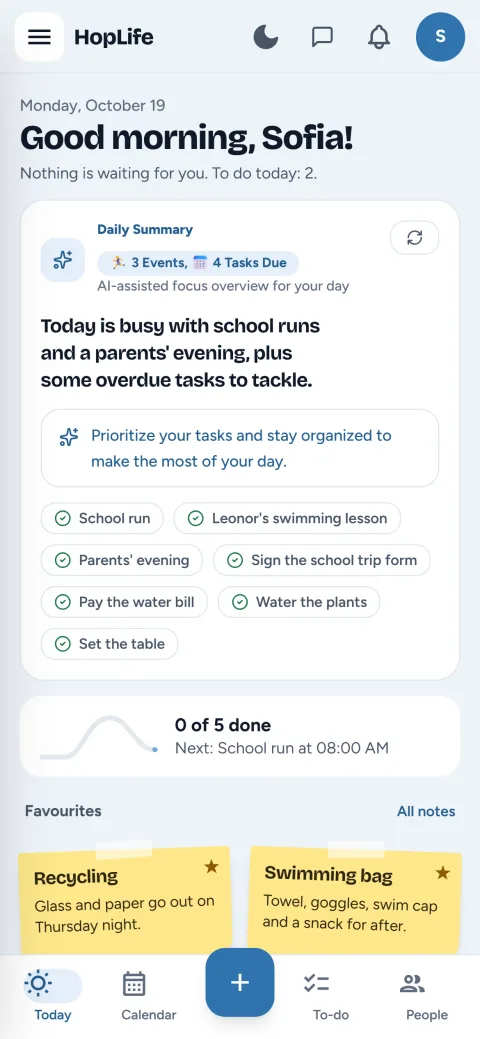
To-dos you can hand to someone else
Assign tasks to anyone in your group
Give a task to yourself, your partner or anyone else in your groups, and everyone sees how it's going.
Due dates and priorities
Set a due date and mark what matters. Today's page lists everything due in time order.
A personal space too
Your own tasks, notes and lists stay yours. Share something only when you want to.
How it works
Add your tasks, with a due date if they have one.
Create a group and invite your partner or family.
Assign tasks to each other and tick them off when they're done.
Questions families ask
Can I use it as a to-do list on my own?
Yes. Everyone gets a personal space. Create a group only when you want to share something.
Is it a good to-do list app for couples?
Yes. A group with just the two of you gives you shared tasks and lists, next to a calendar for your plans.
Is HopLife free?
Yes, there's a free plan you can use for as long as you like. Paid plans add more, and you can compare them in the app before you decide.
Which devices does HopLife work on?
Any up-to-date browser on Windows, Mac, iPad, iPhone and Android. You can add HopLife to your home screen and open it like an app.
Is my family's data private?
Yes. HopLife follows the Swiss nFADP and the GDPR. Only the people you share something with can see it, and you can download or delete all your data from your profile at any time.
More of what HopLife does
Start with your own day, then bring in the family
Create your free account in a minute. Invite the others whenever you're ready.